
Guide
Clean Your TV After a TV Update: When Updates Bring Clutter Back
After a TV update, clutter often returns. Here is how to re-run Clean Your TV after an update, what to check on the new plan, and why the old clean does not carry over.
 By Grace Liu, TV Utility Reviewer
CONTENTS On this page
Why Updates Bring Clutter Back
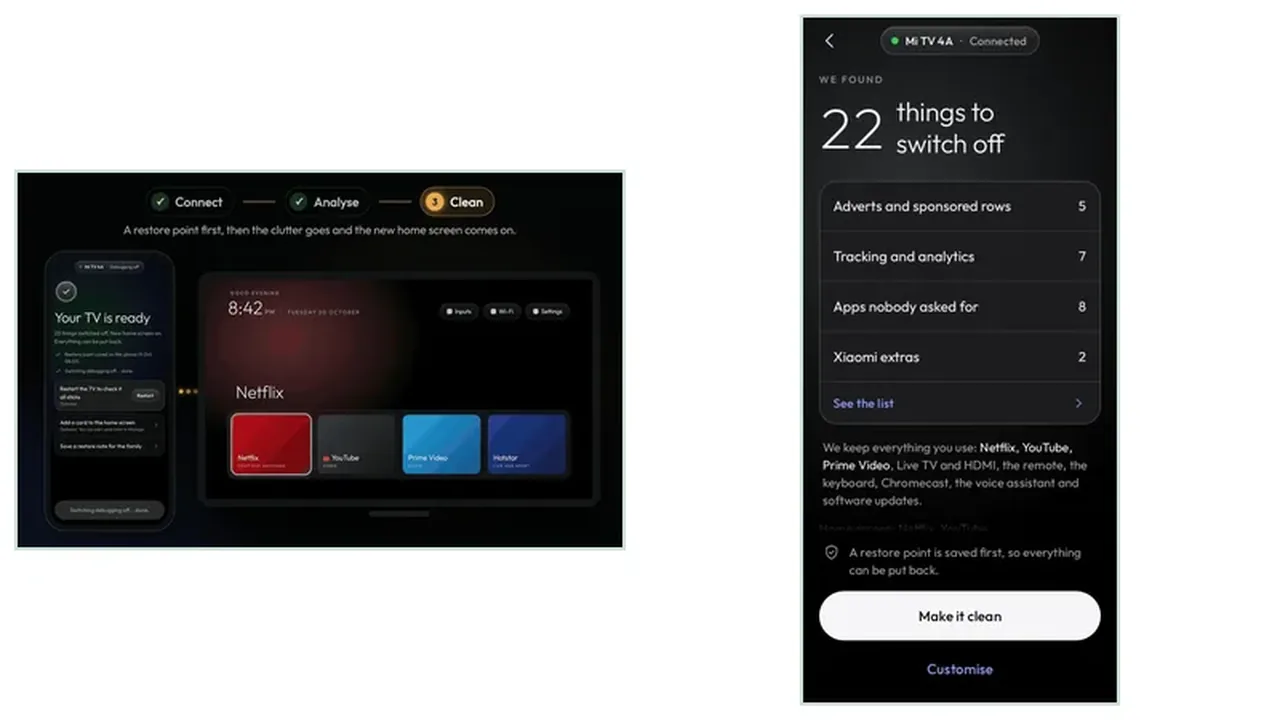
A system update can bring back apps a tidy had switched off, rearrange the apps row, and switch recommendations back on. That is normal, not a fault in the TV, and it is why a tidy TV needs a second look after every update. The Clean Your TV for Android TV approach treats the update as a fresh start: connect again, read the new plan, and clean again.
Do not assume the old plan still fits. An update can change which apps the TV ships with, which features are on by default, and how the home screen is laid out. The Clean Your TV plan you approved three months ago was for a different TV state, and the new plan deserves the same careful read the first one got.
Re-run the Plan, Do Not Assume
Open Clean Your TV on the phone, let it find the TV, and run the analyse step again from scratch. If the trust prompt appears again, approve it with Always allow, just as on the first run. The restore point and undo guide is worth a second read here too, because the restore point from before the update is the safety net if the new clean surprises you.
Compare the new plan with what you remember, but trust the screen in front of you, not your memory. An app you expected to see on the keeps side may have moved groups after the update, and an app you had forgotten may be back on the Clean Your TV clean side. Read both lists before you tap.
What to Check After an Update
After the Clean Your TV clean, walk the TV the way your household actually uses it: open a streaming app, try the live TV input, switch HDMI inputs, and test the remote. If anything feels wrong, undo that one app before you undo anything else. The analyse plan guide shows how to read the groups so a post update surprise is easy to trace back to one group.
Then make a habit of it: after every system update, run the analyse step, even if you decide not to clean that day. A plan read costs a minute and tells you exactly what the update changed, which is better than discovering it on a Friday night when everyone wants to watch something.
After an Update in Short
Updates bring clutter back, so re-run the Clean Your TV plan after every update, read both lists again, and clean only what still makes sense. The tidy home screen is a habit, not a one time job.